



Bhoomi RTC / Pahani Karnataka 2026: How to Access Land Records & Mutation Status Online


Bhoomi RTC is Karnataka’s digital land records system that enables you to view RTC, check mutation status, download signed i-RTC copies, and verify details through official government portals.
Managing land documents has become easy with digital services offered by the Karnataka government. Whether you own an agricultural plot, need to check ownership status, or require official papers for legal purposes, the Bhoomi RTC online portal helps you complete these tasks without visiting / waiting in govt offices.
This article explains how to access these documents online in Karnataka and understand key services.
Table of Contents
What is a Bhoomi RTC (Pahani)? and How to Use It
This is a record issued by the Karnataka Revenue Department. RTC stands for Record of Rights, Tenancy, & Crops; locally known as “Pahani”. It contains important information such as –
- The Owner’s Name
- Survey Number
- Land Size (in Acres-Guntas)
- Soil Type
- Crop
- Tenure Type
- Annual Land Revenue (Kandaya)
It acts as an identity card and helps establish ownership and usage. Farmers, buyers, banks, and govt. departments rely on it for different purposes. Pahani Karnataka is another commonly used name. RTC records are maintained by the Revenue Department and can be accessed through the Bhoomi portal at landrecords.karnataka.gov.in.
Important distinction: Bhoomi only manages rural and agricultural land. If you are buying a house, plot, or flat within BBMP or municipal city limits, your document is a Khata (managed via e-Aasthi or Sakala).
Use Only the Official Bhoomi RTC Portal Online, and How to Spot Fake Websites
Bhoomi online Karnataka offers digital services for viewing these papers through government portals. The following official websites simplify Karnataka land records online for landowners across the state.
| Purpose | Official Portal |
| View RTC and MR records | https://landrecords.karnataka.gov.in/ |
| Download signed i-RTC | https://rtc.karnataka.gov.in/ |
| Mojini V3 services and RTC sketch | https://bhoomojini.karnataka.gov.in/ |
| Survey number GPS location | Dishaank app |
*Any website using the name ‘Bhoomi’ other than the govt. portals listed above, should be treated as unofficial.
How to Read Your RTC: 13 Important Columns
Understanding Your Karnataka RTC / Pahani: What each field means
| No. | Column | What It Shows |
| 1 | Survey Number | Unique identification number |
| 2 | Subdivision Number | Identifies a specific portion, if the survey number has been divided |
| 3 | Owner’s Name | Name of the registered owner |
| 4 | Father’s / Husband’s Name | Used to check the owner’s identity |
| 5 | Total Extent | Size of the plot |
| 6 | Nature | Agricultural, Irrigated, Dry, or another category |
| 7 | Cultivation | Shows who cultivates the land |
| 8 | Crops | 3 agricultural seasons in a year – Kharif, Rabi, Summer |
| 9 | Water Source | Indicates the irrigation source |
| 10 | Revenue Assessment | Revenue payable to the government |
| 11 | Mutation | Tracks ownership changes after sale / inheritance / gift / partition |
| 12 | Liabilities / Remarks | Loans, disputes, restrictions, or important remarks |
| 13 | Bhoomi Khata Number | Revenue account number |
How to Create Your Bhoomi RTC Account Online
Registration is the first step because the portal opens up your land record details and other revenue services only after you have an account of your own. So creating a login or registering on the Bhoomi portal is necessary before you can use any of these facilities.
- Start by going to the login page of the official Bhoomi website: https://landrecords.karnataka.gov.in/service78/Login.aspx
- On that page, click the “Create Account” option. The sign-up form of the portal will open on your screen.
- Fill in the details asked for – your first name, last name, Aadhaar number, email ID, residential address and mobile number.
- Next, an OTP will be sent to the mobile number you have entered. Type that OTP correctly in the space given to confirm your number, and then press the Sign Up / Submit button.
Once your account is ready, checking your land records becomes a lot easier.
Bhoomi Online RTC Portal Login
- To Login in to Bhoomi Online RTC Portal, Open any web browser on your phone or computer and visit the official Bhoomi website.
- You will see a login section on the page — click on it to proceed.
- Now type in your user ID and password, and fill in the captcha code shown on the screen.
- Press the Login button, and your Bhoomi account will open.
If you do not have an account yet, you will have to make one first. Click on the Register or Create Account option, and the portal will take you to the account creation page.
How to Check Your Bhoomi RTC (Pahani) Online: Step-by-Step
Learn how you can check Bhoomi RTC online Karnataka’s land records, by following the 7 steps listed below.
- Visit the portal at https://landrecords.karnataka.gov.in/

- Login: If you are already a registered user, just sign in. If you are visiting for the first time, register yourself and then log in.
- Under RTC Services, click ‘View RTC Information’
- Search using the survey number, owner details, or registration number / date

- Choose your district, taluk, hobli, and village, and submit the request
- The RTC record will appear on the screen – with details such as the owner’s name, crops, and more
- Review the document carefully to ensure all details are correct
- Download or print the RTC for future reference


The portal makes Karnataka land records online simple, for citizens across the state.
How to Track Mutation (MR) Status in Karnataka’s Land Records
Mutation record shows whether changes in ownership have been updated in the Karnataka land records online after sale / inheritance / gift / partition.
- Visit the portal at https://landrecords.karnataka.gov.in/

- Click ‘View RTC and MR’ under RTC Services

- Choose your district, taluk, hobli, and village
- Enter the survey number or mutation registration, if available
- Submit to view the current status
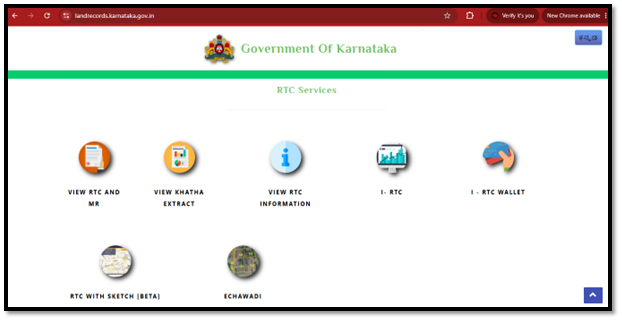
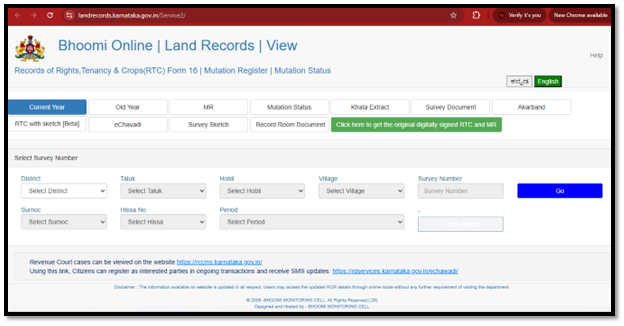
The portal will display whether the mutation request is pending, approved, rejected, or completed – along with the relevant mutation data
Checking Karnataka mutation status online is a simple way to check if ownership changes have been recorded correctly, before proceeding with the transaction.
Free View vs Signed i-RTC: Which One Do Banks or Courts Accept?
| Feature | Free RTC View | Signed i-RTC |
| Purpose | Quick verification | Certified copy for legal & financial use |
| Digital Signature | No | Yes |
| Legal Validity | Informational only | Accepted as a record |
| Best Used For | Checking ownership, survey and crop data | Bank loans, court matters, registration, and govt applications |
| Download | Available free through the portal | Available after paying the prescribed fee through i-RTC portal |
If you only want to confirm the details, free RTC view is sufficient. For legal proceedings, bank loans, or documentation, download the digitally signed i RTC download copy after paying the prescribed fee, as this document is accepted by banks, courts, and government authorities.
Do Not Know Your Survey Number? Use Dishaank & Mojini V3
- Dishaank is a mobile application that uses GPS to help locate land parcels on a map. You can identify the survey number by checking your current location.
- Mojini V3 helps users view survey maps and verify plot boundaries
- You can search for the RTC by survey number through the official portal
Beyond the RTC: Other Documents that are Necessary
- Encumbrance Certificate: EC shows registered loans, mortgages, sales, or legal claims, if any, on the property. Get a detailed overview of how to obtain Encumbrance Certificate Online, to review the registered transaction history of the property.
- Tippan or Akarband: These surveys show the original boundaries, measurements, and survey data. They can be obtained through the Bhoomojini portal or the Survey Department office.
- Khata: It is a municipal record that confirms a property’s registration for tax purposes in urban areas. Buyers exploring luxury apartments in Bangalore should verify Khata through the official e-Aasthi portal.
- More information on how to get property card online in Karnataka can be seen in this article
The continued expansion of Karnataka land records online is making verification more efficient through integrated digital services.
Common Problems: ‘Data Not Found’, Legacy Errors, & ULPIN
- ‘Data Not Found’ Error: This message appears when incorrect survey data is entered, the records have not been digitised, or the information is yet to be updated on the portal
- Legacy Record Errors: Older documents may contain incomplete information, spelling mistakes, or mismatched survey entries as they were maintained manually in the past
- ULPIN: The ULPIN unique land parcel ID is an identification number assigned to every land parcel. It creates a standard digital identity – making record management, verification, and transactions accurate and transparent.
RTC (Rural) vs Khata (Urban): Why Your City Flat is Not on Bhoomi
Many buyers expect to find every property on the Karnataka land records online portal – Bhoomi. However, RTC and Khata documents serve different purposes and apply to different types of properties.
If you are buying apartments for sale in Bangalore within a municipal area, it will generally be recorded under the Khata system instead of the Bhoomi portal. This article explains the difference between A Khata and B Khata properties in detail, and how they impact ownership, taxation, and approvals.
Due Diligence Checklist Before Buying Rural / Agricultural Land
- Match Names Exactly: Verify that the owner’s name in the RTC matches the seller’s identity documents
- Check the survey number and boundaries for accuracy
- Review the mutation of property, to confirm that every ownership change has been updated
- Ensure there are no pending disputes or adverse remarks in the RTC
- Cross-check the Encumbrance Certificate to identify any registered loans or legal claims
- Compare the RTC with Tippan / Akarband records to check measurements and boundaries
- Confirm that the classification matches your intended use, and complies with applicable regulations
- If required, seek legal advice before buying property in India to ensure everything is in order
Conclusion
The Bhoomi RTC portal has made verifying and obtaining records an easy process without visiting govt offices. From checking ownership data and mutation status to downloading a signed i-RTC, the platform offers many essential services in one place.
It is equally important to cross-check the RTC with documents such as Encumbrance Certificate, Tippan, Akarband, and Khata before completing any transaction. By using only government portals and checking every record carefully, you can reduce risks and take informed decisions through Karnataka land records online.
FAQs
What is the official website to check Bhoomi RTC in Karnataka?
The official website to check Bhoomi RTC in Karnataka is https://landrecords.karnataka.gov.in/. Go to Bhoomi RTC website and login, where you can view RTC and MR. Use only Karnataka govt. portals for verification.
What is the difference between RTC and Pahani?
There is no difference between RTC and Pahani, as both refer to the same record issued by the Karnataka Revenue Department. It contains information such as ownership, survey number, crop, and tenancy.
How do I download a digitally signed RTC (i-RTC)?
To download a digitally signed RTC (i-RTC), visit https://rtc.karnataka.gov.in/ and pay the prescribed fee. The signed i-RTC is accepted for legal and financial purposes.
Is the free RTC view legally valid for a bank loan?
Free RTC view is not legally valid for a bank loan, as it is meant only for information and verification. Banks generally require the digitally signed i-RTC for official purposes.
How do I find my survey number, if I do not know it?
To find your survey number, use the Dishaank app to locate your property through GPS or check survey maps on the Bhoomojini portal at https://bhoomojini.karnataka.gov.in/
How long does mutation take in Karnataka in 2026?
The mutation process in Karnataka in 2026 depends on the verification process and the concerned Revenue Department. You can track its progress through https://landrecords.karnataka.gov.in/
Why is my land showing 'Data Not Found' on Bhoomi RTC?
'Data Not Found' on Bhoomi RTC may appear if the survey details entered are incorrect, the records have not been digitised, or the information is yet to be updated on the portal.
Why can't I find my Bangalore apartment on the Bhoomi portal?
Bhoomi portal maintains records for agricultural and rural land. Karnataka properties within municipal limits are recorded under the Khata system at https://bbmpeaasthi.karnataka.gov.in/citizen_core/
You might also like


